A YouTube Shorts music video from your song
Upload your song → see a 10-second preview of your music video
No subscription · $5 preview
Updated
Quick answer
How do I make a YouTube Shorts video for my song? Upload the song to Clipbeat. For a quick Short, the 60-second vertical video picks the strongest part of the song and costs $5 one-time. For the full song, make a music video (from $5 Standard, $19 Plus or $39 Premium) and export a 9:16 version from the same project, or publish it straight to a connected YouTube channel.
For many independent artists, Shorts are now where new listeners first hear a song. A Short sits in the same app as your long-form music video, so a viewer who likes the hook is one tap away from the full track on your channel. The catch is that a Short needs vertical footage, and a widescreen music video squeezed into a phone screen loses half the picture.
Clipbeat gives you two ways to get vertical video for YouTube. You can turn the strongest part of your song into a ready-made vertical clip, or you can make the full music video and export a 9:16 version alongside the 16:9 one. Either way, the scenes come from your lyrics and the cuts land on the beat.
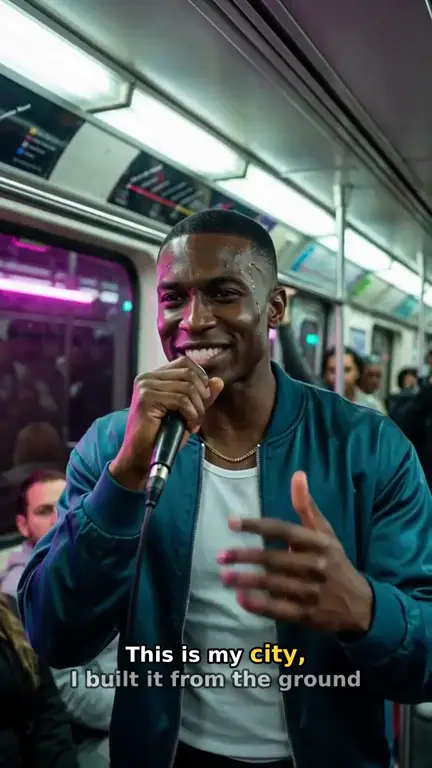
Real output · “Neon Crown”, hip-hop
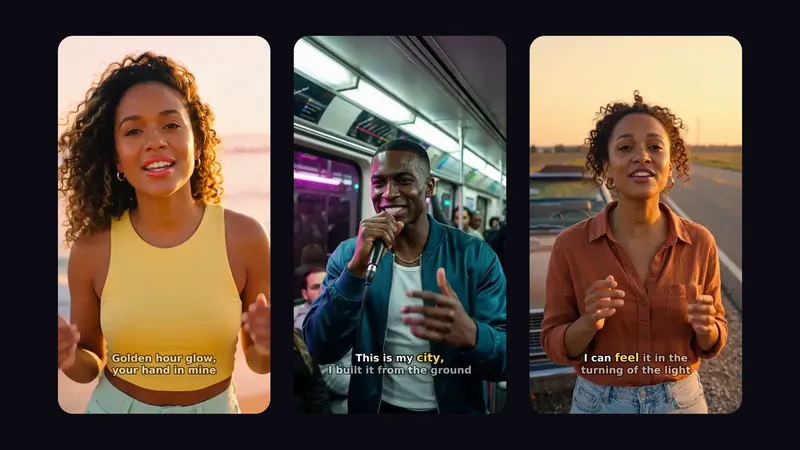
Clipbeat at a glance
| Price per video | from $5 Standard, $19 Plus or $39 Premium — one-time, priced by song length; a 4-minute song is $14 Standard, $30 Plus or $69 Premium |
|---|---|
| Longer songs | Priced by length, up to 20 minutes; the exact price is shown before you pay |
| Before you pay | Your upload, the timed lyrics and your brief (who sings, the style, the places) — no card needed |
| Scene-by-scene plan | After the $5 chorus preview, before you pay for the full video |
| Chorus preview | A short lip-synced clip of your singer singing your chorus, included in the $5 credit pack |
| Subscription | None — nothing renews |
| Lip-sync | Plus, Premium and Pro (the singing shots follow your vocal) |
| Output | 1080p MP4 without a watermark, 16:9 or 9:16 (1:1 and 4:5 from the editor) |
| Upload | MP3, WAV, M4A, FLAC or AIFF, up to 500 MB |
| Lyrics | Transcribed automatically in 50+ languages, shown word by word, karaoke-style |
How it works
- STEP 1
Upload your song
Choose the MP3 or WAV in Clipbeat Studio. The lyrics are transcribed word by word and can be corrected.
- STEP 2
Pick the format
Go for the 60-second vertical video, or plan the full-song music video and its storyboard first.
- STEP 3
Check before you pay
For the full video, read the scene plan after the chorus preview and adjust it before you choose a tier.
- STEP 4
Export 9:16 and post
Download the vertical file, or connect your YouTube account in Studio and publish from there.
A real example: “Neon Crown”
A full hip-hop song made into a video with Clipbeat on Premium — 20 scenes, one for every lyric line, the same singer throughout and 8 lip-synced singing shots.
Two routes to a Short
Which route fits depends on whether the Short is the whole campaign or a trailer for something longer. Both give you a 9:16 file with the song as the soundtrack.
- The 60-second vertical video ($5, one-time): Clipbeat finds the part of the song that works best on its own and builds a vertical video around it. The quickest way to post something for a new single.
- The full music video in 9:16 (from $5 Standard, $19 Plus or $39 Premium): every lyric line becomes its own scene for the whole song. Export it vertical for Shorts and widescreen for the main upload on your channel.
Shorts that point to the full video
A Short works best as a door into your channel. Post the chorus as a Short in release week, then link it to the full music video so viewers who want more land on the long version. Because both cuts come from the same Clipbeat project, the singer, the setting and the colours match — the Short looks like a piece of the video, not a separate clip.
A practical rhythm for a single: one Short with the hook on release day, a second with a different verse a few days later, and the full video pinned on the channel. Each Short gives the algorithm another chance to show the song to someone new.
Framed for a phone, not cropped
When a widescreen video is cut down to vertical after the fact, faces drift to the edge and the lyrics spill off the screen. A Clipbeat 9:16 export is composed for the tall frame: the performer sits in the centre, the scene extends up and down, and the karaoke lyrics are placed where they stay readable around the on-screen buttons of the Shorts player.
Lip-sync in your Shorts
A Short is often the chorus, and the chorus is where a singing face matters most. Plus ($19) lip-syncs your singer on the chorus (2–3 shots, your vocals); Premium ($39) lip-syncs up to 12 singing shots across the song, not every line. Standard ($5) has full motion and lyrics on screen but no lip-sync.
Prices
The 60-second vertical video is $5, one-time. A full-song music video is priced by length and tier, also paid once with no subscription. Priced by song length: Standard from $5, Plus from $19, Premium from $39. Standard / Plus / Premium: a 2-minute song $5 / $20 / $39, a 4-minute song $14 / $30 / $69, a 6-minute song $21 / $39 / $100. Pro has its own length table from $100. Premium for songs over 10 minutes is on request — write to us from the Contact page. You see the exact price for your song before you pay.
- Standard (from $5) — the full song with a scene for every lyric line, full motion, word-by-word karaoke lyrics, 1080p without a watermark.
- Plus (from $19) — everything in Standard (full motion, a scene for every lyric line, word-by-word karaoke lyrics, 1080p without a watermark), plus your singer lip-syncing the chorus with your vocals (2–3 shots).
- Premium (from $39) — full motion with the best image and motion models, extra quality checks on every shot, and real lip-sync on up to 12 singing shots.
About the example
The video on this page is "Neon Crown", a hip-hop track from our showcase, 2:08 long, made into 20 scenes on Premium ($39) with 8 lip-synced singing shots. What you see here is the widescreen cut; the vertical version for Shorts comes from the same project, with the rooftop and subway performance shots framed for a phone.
Before you post
Check YouTube's current Shorts rules for length and music in its own help pages, since they change from time to time. You need the rights to the song you post, and if the music or visuals were made with AI tools, follow YouTube's rules on labelling altered or synthetic content. Clipbeat videos come without a watermark, so the Short carries your branding, not ours.
Frequently asked questions
Can Clipbeat make a vertical video for YouTube Shorts?
Yes. Choose the 60-second vertical video ($5), or export a 9:16 version of your full music video from the same project.
Can I publish to YouTube directly?
Yes. Connect your YouTube account in Studio and publish from there, or download the file and upload it yourself.
Do I need a separate project for the Short and the full video?
No. The full music video can be exported in 16:9 for your channel and in 9:16 for Shorts from one project.
Is there a watermark?
No. Paid videos come without a Clipbeat watermark; full-song videos are delivered at 1080p.
How much does it cost?
$5 for the 60-second vertical video, or from $5 Standard, $19 Plus or $39 Premium for a full-song music video. One-time, no subscription.
Make your Short
Upload your song and choose the vertical cut or the full video. From $5 one-time, no subscription.
Make my video