Turn your photo into a music video — with you as the singer
Upload your song → see a 10-second preview of your music video
No subscription · $5 preview
Updated
Quick answer
How do I turn my photos into a music video? Two ways. To star in it, upload your song to Clipbeat, pick "My photo" as the singer and add one clear, front-facing photo of just your face: the AI builds every scene around you, and your other pictures are not used as scenes. A $5 preview shows you singing your chorus first; full videos start at $5, one-time. For a slideshow of the pictures you already have, open the full editor in Studio and drop the photos and the song into the AI Director — that costs nothing, exported at 720p with a small watermark.
Most people searching for "photos to music video" want one of two things. Some want a slideshow: holiday pictures or tour photos cut to a track. Many musicians want something bigger — a real music video of their own song, with themselves in it, made from one photo of their face. Clipbeat does both, but they are different tools, so this page keeps them apart.
The main path is the music video with you as the singer. You upload your song, pick "My photo" as the singer and add one clear photo of your face. That photo is used only for your face: Clipbeat plans and generates every scene — places, clothes, light — around you, line by line from your lyrics. Landscapes, posters, album covers and group pictures cannot be used for it. The first payment is the $5 chorus preview of you singing; after it you see the scene-by-scene plan and pay once for the full video.
The second path is a slideshow of the pictures you already have, built in the full Studio editor. It costs nothing, but an export before any purchase is 720p with a small Clipbeat watermark — fine for a family video, usually not what an artist wants for a release.
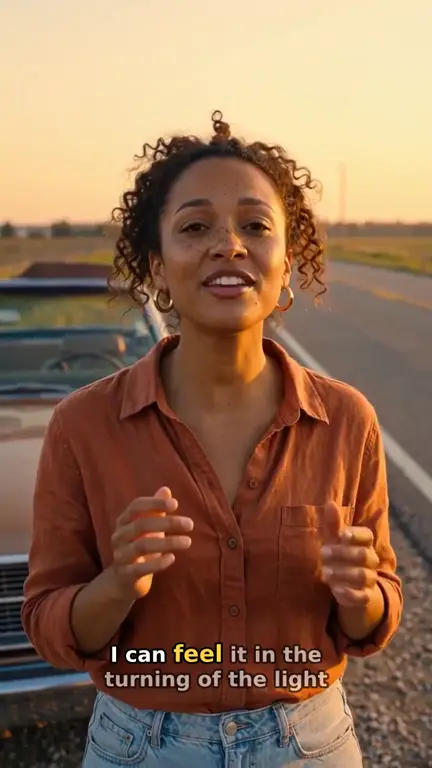
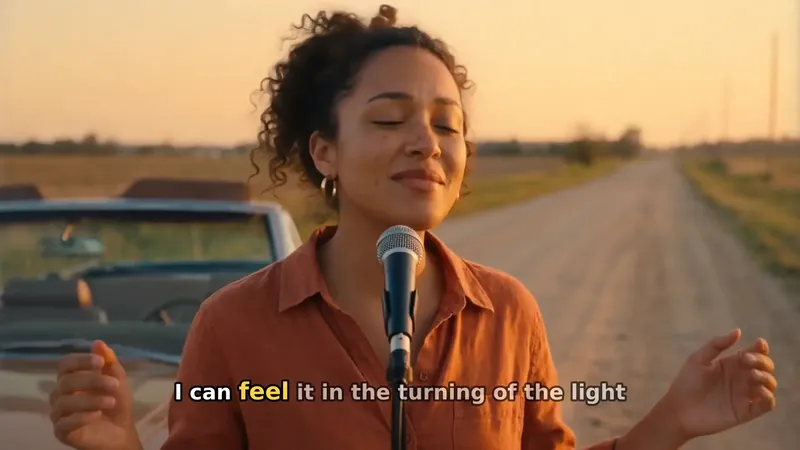
Real output · “Golden Road Home”, acoustic folk
Clipbeat at a glance
| Price per video | from $5 Standard, $19 Plus or $39 Premium — one-time, priced by song length; a 4-minute song is $14 Standard, $30 Plus or $69 Premium |
|---|---|
| Longer songs | Priced by length, up to 20 minutes; the exact price is shown before you pay |
| Before you pay | Your upload, the timed lyrics and your brief (who sings, the style, the places) — no card needed |
| Scene-by-scene plan | After the $5 chorus preview, before you pay for the full video |
| Chorus preview | A short lip-synced clip of your singer singing your chorus, included in the $5 credit pack |
| Subscription | None — nothing renews |
| Lip-sync | Plus, Premium and Pro (the singing shots follow your vocal) |
| Output | 1080p MP4 without a watermark, 16:9 or 9:16 (1:1 and 4:5 from the editor) |
| Upload | MP3, WAV, M4A, FLAC or AIFF, up to 500 MB |
| Lyrics | Transcribed automatically in 50+ languages, shown word by word, karaoke-style |
How it works
- STEP 1
Upload your song
Drop in the finished MP3 or WAV with vocals. The lyrics are transcribed and timed automatically, and you can correct any word. No card is needed for this step.
- STEP 2
Choose "My photo" and add one photo of your face
In "Who sings?", pick "My photo" and take or upload one picture of just you: face to the camera, good light, no sunglasses. A quick face check runs first and turns down pictures without a clear face, such as landscapes, posters or album covers. Prefer not to show your real face? "AI me" turns the same selfie into a cartoon or movie-style version of you, or you can pick an AI singer.
- STEP 3
Watch your chorus preview, then check the plan
Pick the style and the places, then watch a short preview of you singing your chorus; it comes with the $5 credit pack. After it you see the scene-by-scene plan and change what you do not like. Then pay once for the full video: from $5 Standard, $19 Plus or $39 Premium.
- STEP 4
Export and post
Download the 1080p video without a watermark, cut a vertical chorus clip from the same project, or publish to YouTube, TikTok and Instagram from Studio.
A real example: “Golden Road Home”
A full acoustic folk song made into a video with Clipbeat on Premium — 20 scenes, one for every lyric line, the same singer throughout and 5 lip-synced singing shots.
Path 1: a music video where you sing your song
With "Me" selected, your selfie becomes the identity reference for the lead. Every scene that features the singer — the street at night, the rooftop at sunrise, the stage in the chorus — is generated with your face, so the video looks like you went on a shoot. The scenes still follow your lyrics line by line and the cuts land on the beat.
What changes by tier is how much moves and whether the mouth follows the words. On Standard ($5) you are the main character, but the performance shots are animated without matching your lips to the vocal. On Plus ($19) your lips follow your vocal on 2–3 chorus shots. On Premium ($39) up to 12 singing shots across the song (not every line) are lip-synced to your isolated vocal track, which is what makes a viewer believe it is really you singing. a 4-minute song is $14 Standard, $30 Plus or $69 Premium; longer songs are priced by length and you see the exact price before paying.
Which photo works best
One good selfie beats ten average ones. The face model needs to see you clearly; everything else (clothes, setting, lighting of each scene) is generated around it.
- Face the camera, eyes open, whole face in the frame
- Even daylight or soft indoor light — no harsh shadows across the face
- No sunglasses, masks, heavy filters or beauty-app smoothing
- Only you in the picture; crop out friends and backgrounds
- Up to 40 MB; large photos are downscaled in your browser before upload
Consent and whose face you can use
Use your own likeness, or an adult band member who clearly agreed to be in the video. Do not upload celebrities, public figures or anyone who has not said yes. Clipbeat does not identify people in photos; the selfie is only used as the look of the lead in your own project.
An example of lip-synced singing shots
"Golden Road Home" is an acoustic folk demo song, 2:24 long, made into 20 scenes with 5 lip-synced singing shots. The singer in this example is an AI character, not a real person. When you choose "Me", your face takes that role and the same kind of shots are made with you.
Path 2: a slideshow from your own photos
If you only want your pictures set to music, open Studio's AI Director, drop in the photos and the song and ask for a video. The photos are spread across the track on the beat with gentle Ken Burns motion, optional crossfades and an optional title card. Leave the song out for a silent slideshow and choose how long each photo stays on screen. Placing your own photos does not use credits.
Be clear about the output: an export before any purchase is 720p with a small Clipbeat watermark. For a clean file, any credit pack (from $5, one-time) unlocks 1080p without the watermark. A slideshow also does not add new scenes, motion shots or lip-sync — it only moves and cuts the photos you already have.
- Up to 200 photos per project; long edge downscaled to 2560 px
- Name files 01_, 02_, 03_ to control the order, or drag them on the timeline
- HEIC opens in Safari; in other browsers convert to JPEG first
Which path should you pick?
Pick the slideshow for memories, a tribute or a quick visual for a demo you are not releasing. Pick the music video with you in it for a single, an EP focus track or anything that goes on YouTube, TikTok or Spotify: a performer people recognise keeps viewers watching longer than a sequence of stills. If the budget is tight, Standard ($5) with "Me" still puts you in every scene; step up to Premium when you want the singing to look real.
Frequently asked questions
Can I be the singer in my music video with just one photo?
Yes. Choose "Me" and add one clear selfie; you become the lead in every scene. Lip-sync on the singing shots is part of Premium ($39).
Do Standard and Plus include lip-sync?
On Plus, yes — on the chorus: your lips follow your vocal on 2–3 chorus shots. On Standard your face is used for the lead, but the mouth is not matched to the vocal. Premium lip-syncs up to 12 singing shots across the song, not every line.
Can I make the photo slideshow without paying?
Yes, building it costs nothing. An export before any purchase is 720p with a small watermark; any credit pack (from $5, one-time) unlocks 1080p without the watermark.
Can I use a photo of someone else?
Only an adult who clearly agreed to it. Never upload celebrities, public figures or people who did not consent.
Can I make a vertical version for Reels or TikTok?
Yes. Set the project to 9:16 before the video is made, or cut a vertical chorus clip from the finished project.
Do I need lyrics in the song?
A vocal works best for the video with you singing, because the scenes and lip-sync follow the sung lyrics. A photo slideshow works with instrumentals too.
Put yourself in your music video
Upload your song, choose "Me" and add a selfie. The scene plan follows the $5 chorus preview; your video from $5 one-time, lip-sync on Premium.
Make my video