Lyric video maker with automatic sync
Upload your song → see a 10-second preview of your music video
No subscription · $5 preview
Updated
Quick answer
How do I make a lyric video for my song? Upload the song to Clipbeat: the lyrics are transcribed and timed word by word automatically, so you only style them over your own photos, footage or AI backgrounds and export in 16:9 for YouTube or 9:16 for TikTok and Reels. If you want AI to make a scene for every line with karaoke lyrics, the scene plan comes after the $5 chorus preview and the finished video is from $5 one-time.
A lyric video is often the first video an independent release gets — it is quick to publish, it helps listeners sing along, and it gives a new song a home on YouTube before a full music video exists. The slow part has always been timing: placing every line by hand against the waveform can take an evening for a single track.
Clipbeat does the timing for you and leaves the design in your hands. Upload your song, and the lyrics are transcribed with word-level timestamps, laid out on a timeline and ready to style over your own photos, footage or AI backgrounds. You spend your time on the look of the video instead of on nudging subtitles.
This page is about building a lyric video yourself in the editor. If you would rather have AI plan and generate a scene for every line with karaoke-style highlighting, see the AI lyric video generator instead.
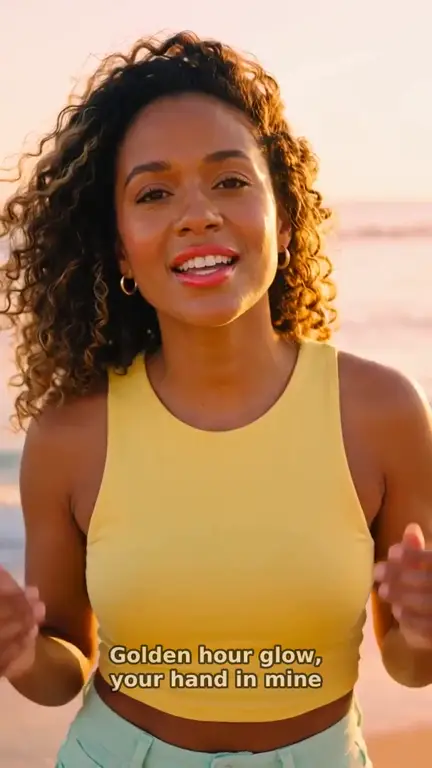
Real output · “Golden Hour Glow”, pop
Clipbeat at a glance
| Price per video | from $5 Standard, $19 Plus or $39 Premium — one-time, priced by song length; a 4-minute song is $14 Standard, $30 Plus or $69 Premium |
|---|---|
| Longer songs | Priced by length, up to 20 minutes; the exact price is shown before you pay |
| Before you pay | Your upload, the timed lyrics and your brief (who sings, the style, the places) — no card needed |
| Scene-by-scene plan | After the $5 chorus preview, before you pay for the full video |
| Chorus preview | A short lip-synced clip of your singer singing your chorus, included in the $5 credit pack |
| Subscription | None — nothing renews |
| Lip-sync | Plus, Premium and Pro (the singing shots follow your vocal) |
| Output | 1080p MP4 without a watermark, 16:9 or 9:16 (1:1 and 4:5 from the editor) |
| Upload | MP3, WAV, M4A, FLAC or AIFF, up to 500 MB |
| Lyrics | Transcribed automatically in 50+ languages, shown word by word, karaoke-style |
How it works
- STEP 1
Upload your song
Drop an mp3 or wav file — including a track you downloaded from Suno. The audio is analysed and the vocals are transcribed automatically.
- STEP 2
Check the words
Every line and word is editable. Fix a misheard lyric, split a long line or adjust a timestamp directly on the timeline.
- STEP 3
Pick a style and background
Choose how lyrics appear, then place your own photos or clips, AI-generated images or stock footage behind them.
- STEP 4
Export
Render the video in your browser in the format you need — 16:9 for YouTube, 9:16 for Shorts, Reels and TikTok, or square.
A real example: “Golden Hour Glow”
A full pop song made into a video with Clipbeat on Premium — 16 scenes, one for every lyric line, the same singer throughout and 5 lip-synced singing shots.
Lyrics that follow the vocal, word by word
Transcription handles more than fifty languages. It returns a timestamp for each word, not just for each line, which is what makes a lyric video feel locked to the performance.
Clear vocals usually need little or no correction. Heavily processed, layered or buried vocals can confuse any transcription model, so every word remains editable — you are never stuck with a mistake. You can also paste the lyrics you wrote and keep the automatic timing.
Three ways to show the lyrics
Different songs need different treatments, so the lyric track has three display modes:
- Single line — one line at a time, the classic subtitle look for most lyric videos.
- Word by word — words appear as they are sung, good for rap, fast verses and short-form clips.
- All lines — the full verse stays on screen with the current line in focus, closer to a karaoke layout.
Typography is where a lyric video gets its identity
Because the timing is already done, the creative decisions are about type: how big the words sit in the frame, where they live on a vertical versus a horizontal canvas, how much contrast they need against a busy background. A ballad usually wants calm, centred lines with plenty of breathing room; a fast rap verse reads better word by word, low in the frame, so the background can stay visible.
A good habit is to watch the draft once on a phone with the sound off. If you can follow the song from the text alone, the lyric video works on the platforms where most people will first see it.
Backgrounds that match the mood
A lyric video does not need a film crew, but it does need something to look at. Your own artwork, live photos and phone clips work well and cost nothing to place. You can also generate background images with AI — photoreal, illustrated or poster-style — from a short description of the mood, animate a still into a short moving shot, search Pexels and Pixabay for stock footage.
Scene changes can follow the beat of the song, so cuts land where a listener expects them instead of drifting against the rhythm.
Editor, or a finished video for a one-time price
Using the editor costs nothing. Uploading your song gives you timed lyrics, and building a lyric video from your own photos and clips costs nothing: export in your browser at 720p with a small Clipbeat watermark, with no limit on length or number of exports. Automatic lyrics come with every song you upload, and an AI background image with Photoreal costs 3 credits.
If you want Clipbeat to make the whole video from the storyboard instead, you pay once for that video — from $5 Standard, $19 Plus or $39 Premium. The $5 Standard video already includes a scene for every lyric line and word-by-word karaoke lyrics at 1080p without a watermark. For the editor's own exports, any credit pack (from $5, one-time) unlocks 1080p without the watermark.
Who it is for
Clipbeat is built for independent musicians, producers and small labels who release often and cannot hire an editor for every single. If you can describe the look you want and drag clips on a timeline, you can make a lyric video here — and if you would rather not touch a timeline at all, the one-time video does it for you.
Frequently asked questions
How long does it take to make a lyric video?
The timing is automatic, so most of the work is choosing a style and backgrounds, which is up to you. A simple lyric video over one background image can be finished in a single sitting.
Can I fix wrong lyrics?
Yes. Every word and its timing can be edited on the timeline, and you can paste your own lyrics if you prefer.
Which languages are supported?
Auto lyrics support more than fifty languages and detect the language automatically. Accuracy is best on clear vocals.
Can I make a vertical lyric video for TikTok or Reels?
Yes. Switch the project to 9:16 and export; you can also export short sections of the song for clips.
Can I make a lyric video without paying?
Yes, with your own visuals: browser export at 720p with a small watermark costs nothing. AI-generated scenes are paid, either per video (from $5 one-time) or with credits.
What is the difference between this and the AI lyric video generator?
Here you design the lyric video yourself in the editor. The AI lyric video generator plans and generates a scene for every lyric line for you, with karaoke-style highlighting, as a one-time paid video.
Make your first lyric video
Upload a song, preview the chorus and get a scene plan matched to your lyrics. Your video: $5 one-time, no subscription.
Make my video