Turn your Suno song into a music video
Upload your song → see a 10-second preview of your music video
No subscription · $5 preview
Updated
Suno makes it possible to write and produce a full song without a studio. Then comes the next question: how do you share it? Audio alone does poorly on YouTube, TikTok and Reels. A song needs a video — even a simple one with lyrics — to travel.
Clipbeat is the step after Suno. Download the song from Suno, upload the file, get the lyrics synced automatically, hear a chorus preview and see a scene plan for every line, then turn it into a video ready for every platform.
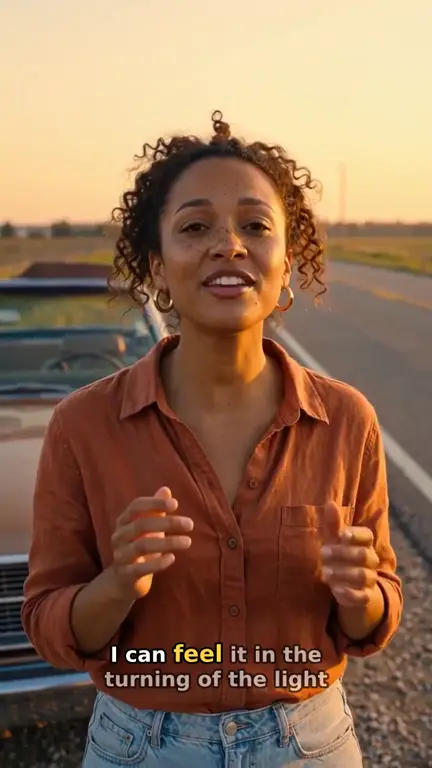
Real output · “Golden Road Home”, acoustic folk

Clipbeat at a glance
| Price per video | from $5 Standard, $19 Plus or $39 Premium — one-time, priced by song length; a 4-minute song is $14 Standard, $30 Plus or $69 Premium |
|---|---|
| Longer songs | Priced by length, up to 20 minutes; the exact price is shown before you pay |
| Before you pay | Your upload, the timed lyrics and your brief (who sings, the style, the places) — no card needed |
| Scene-by-scene plan | After the $5 chorus preview, before you pay for the full video |
| Chorus preview | A short lip-synced clip of your singer singing your chorus, included in the $5 credit pack |
| Subscription | None — nothing renews |
| Lip-sync | Plus, Premium and Pro (the singing shots follow your vocal) |
| Output | 1080p MP4 without a watermark, 16:9 or 9:16 (1:1 and 4:5 from the editor) |
| Upload | MP3, WAV, M4A, FLAC or AIFF, up to 500 MB |
| Lyrics | Transcribed automatically in 50+ languages, shown word by word, karaoke-style |
How it works
- STEP 1
Download from Suno, upload here
In Suno, open the ⋯ menu on your song and choose Download → MP3 Audio (or WAV). Then upload that file to Clipbeat.
- STEP 2
Lyrics sync automatically
The vocals are transcribed with word-level timing. If you already have the lyrics from Suno, you can correct any word on the timeline.
- STEP 3
Check the scene plan
Each lyric line gets a planned scene. Describe the look you want and adjust the plan before the video is generated.
- STEP 4
Make it and export
Pay once to have the whole song made, or build scenes by hand. Export 16:9 for YouTube and 9:16 clips of the hook for TikTok, Shorts and Reels.
A real example: “Golden Road Home”
A full acoustic folk song made into a video with Clipbeat on Premium — 20 scenes, one for every lyric line, the same singer throughout and 5 lip-synced singing shots.
Why AI songs need videos
Short-form platforms reward videos, not audio files. A lyric video or a visual clip of the chorus gives people a reason to stop scrolling and a way to understand the song on mute. For AI-made music in particular, strong visuals help a track feel like a finished release.
Getting the file out of Suno
Clipbeat works from the audio file itself. Importing by Suno link is not supported, because Suno does not let other apps fetch songs that way. Open the song in Suno, use the ⋯ menu and choose Download, then pick MP3 Audio or WAV. WAV keeps the full quality; MP3 is smaller and uploads faster on a phone connection. Either works for transcription and beat detection.
If Suno gave you the lyrics, keep them handy. Transcription is usually close on clear AI vocals, but generated voices sometimes blur consonants or stretch syllables, and pasting your original words is the quickest fix.
Match the visuals to the style
Suno songs cover every genre, so the video should follow the song rather than a template. Describe the mood — synthwave night drive, acoustic sunset, dark trap alley, dreamy lo-fi bedroom — and the storyboard follows it. In the editor you can also generate scenes yourself, animate them, or add stock footage and your own clips.
- Auto lyrics — included with every song you upload
- Photoreal image — 3 credits
- Steady faces video shot — 15 credits
- Browser export — never uses credits
One price for the whole Suno song
Uploading your Suno song costs nothing: you get your lyrics transcribed and set the brief, no payment needed. The $5 chorus preview comes next, then the lyric-matched storyboard. To have Clipbeat make the video, you pay once — from $5 Standard, $19 Plus or $39 Premium — with no subscription.
- Standard (from $5) — the full song with a scene for every lyric line, full motion, word-by-word karaoke lyrics, 1080p without a watermark.
- Plus (from $19) — everything in Standard (full motion, a scene for every lyric line, word-by-word karaoke lyrics, 1080p without a watermark), plus your singer lip-syncing the chorus with your vocals (2–3 shots).
- Premium (from $39) — full motion with the best image and motion models, extra quality checks on every shot, and real lip-sync on up to 12 singing shots.
Check your Suno rights before you publish
Clipbeat does not change who owns the song. Suno's terms decide what you may do with tracks you make there, and they differ by plan — songs made on some no-cost plans may be limited to non-commercial use. Read Suno's current terms before you monetize a video or distribute the song.
The video you create in Clipbeat is yours, and you are responsible for having the rights to the music and any other material you upload.
Building it yourself instead
Prefer to make every decision by hand? Using the editor costs nothing: place your own photos and clips over the synced lyrics and export in your browser at 720p with a small watermark. For 1080p without the watermark, any credit pack (from $5, one-time) unlocks 1080p without the watermark. Many Suno creators start with the $5 video and then trim the chorus into vertical clips in the editor.
Frequently asked questions
Can I import directly from a Suno link?
No. Suno does not let other apps download songs by link, so a link alone is not enough. Download the song from Suno (⋯ menu → Download → MP3 Audio or WAV) and upload the file — it takes a few seconds.
Are my Suno lyrics used?
The vocals are transcribed automatically so each word is timed. You can edit or replace any line with your original lyrics.
Can I monetize a video of a Suno song?
That depends on Suno's terms for the plan you used when you made the song. Check them before monetizing.
Can I make TikTok clips of the chorus?
Yes. Export just the section you want in 9:16, or set the project to vertical before ordering so the whole video is made in 9:16.
Does it work with Udio or other AI music tools?
Yes. Clipbeat only needs an audio file, so any tool that lets you download an mp3 or wav works the same way.
Give your Suno song a video
Upload your Suno track, preview the chorus and get a scene plan matched to your lyrics. Your video: $5 one-time, no subscription.
Make my video