AI lyric video generator with word-by-word karaoke lyrics
Upload your song → see a 10-second preview of your music video
No subscription · $5 preview
Updated
Quick answer
What is the best AI lyric video generator? Clipbeat makes an AI lyric video from your audio file: every lyric line gets its own AI scene, the words light up karaoke-style as they are sung and cuts land on the beat. The scene plan comes after the $5 chorus preview; the full video is from $5 Standard, $19 Plus or $39 Premium, paid once with no subscription. Premium adds lip-sync on the singing shots.
Most lyric videos are text on a background: a looping clip or a photo with the words scrolling over it. That works, but it rarely gives a listener a reason to keep watching. An AI lyric video goes further — the picture changes with the words, so each line of the song gets an image that belongs to it.
Clipbeat generates that automatically from your audio. Every lyric line becomes its own AI scene, the scenes move and cut on the beat, and the lyrics appear on screen word by word, highlighted karaoke-style at the exact moment they are sung. You do not lay out a single caption by hand.
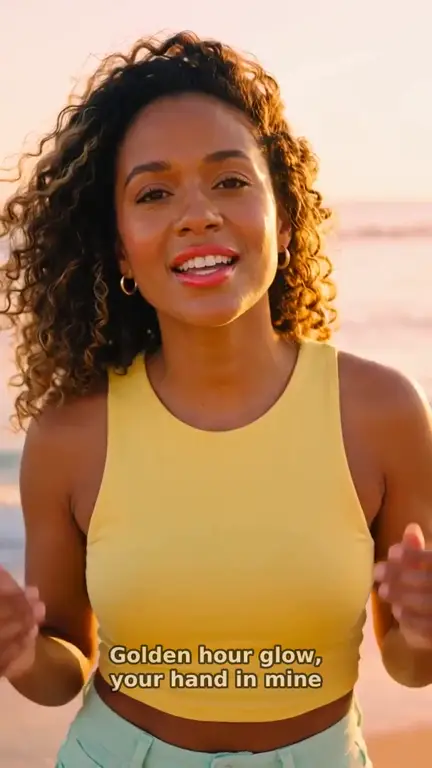
Real output · “Golden Hour Glow”, pop
Clipbeat at a glance
| Price per video | from $5 Standard, $19 Plus or $39 Premium — one-time, priced by song length; a 4-minute song is $14 Standard, $30 Plus or $69 Premium |
|---|---|
| Longer songs | Priced by length, up to 20 minutes; the exact price is shown before you pay |
| Before you pay | Your upload, the timed lyrics and your brief (who sings, the style, the places) — no card needed |
| Scene-by-scene plan | After the $5 chorus preview, before you pay for the full video |
| Chorus preview | A short lip-synced clip of your singer singing your chorus, included in the $5 credit pack |
| Subscription | None — nothing renews |
| Lip-sync | Plus, Premium and Pro (the singing shots follow your vocal) |
| Output | 1080p MP4 without a watermark, 16:9 or 9:16 (1:1 and 4:5 from the editor) |
| Upload | MP3, WAV, M4A, FLAC or AIFF, up to 500 MB |
| Lyrics | Transcribed automatically in 50+ languages, shown word by word, karaoke-style |
How it works
- STEP 1
Upload your song
Use the final mp3 or wav. Suno songs work too: download the file from Suno and upload it.
- STEP 2
Check the timed lyrics
Clipbeat transcribes the vocal with a timestamp on every word. Correct anything misheard — the timing follows your edits.
- STEP 3
Review the scene plan
After the chorus preview, see the scene planned for each lyric line before paying for the video.
- STEP 4
Generate the video
Pay once — from $5 Standard, $19 Plus or $39 Premium — and the full song is made with AI scenes and karaoke lyrics.
A real example: “Golden Hour Glow”
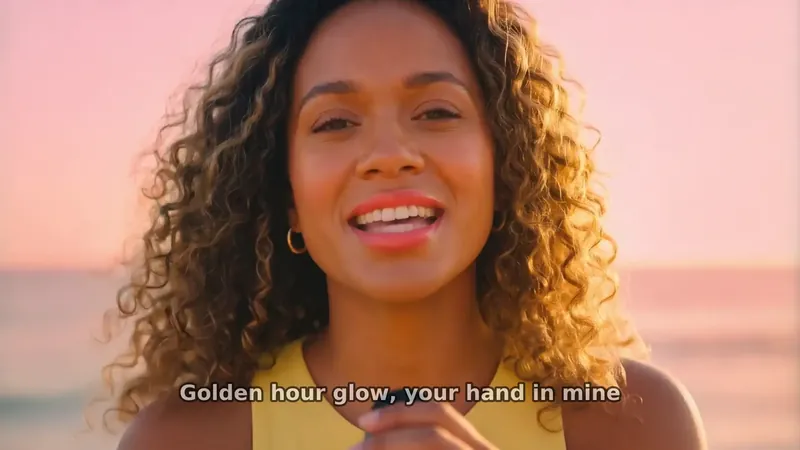
A full pop song made into a video with Clipbeat on Premium — 16 scenes, one for every lyric line, the same singer throughout and 5 lip-synced singing shots.
AI lyric video vs. a classic lyric video
A classic lyric video puts typography over a fixed background, and the creative work is in the type: fonts, placement, timing. If that is what you want, our lyric video maker page covers the editor route, where you style the lyrics yourself over your own photos or stock footage.
This page is about the fully automatic route. Here the visuals are the point: the generator reads the lyrics, writes a scene for every line, keeps the same main character in each one and animates them. The words still sit on screen, but they are layered over a real music video rather than a wallpaper.
How the karaoke highlighting works
Karaoke lyrics depend on knowing when each word is sung, not just each line. Clipbeat transcribes your vocal with per-word timestamps in more than fifty languages and aligns the lyric lines to those word times. On screen, the full line appears and each word lights up as the singer reaches it.
Because the timing comes from the actual vocal, fast verses, held notes and pauses are all handled the same way. If the transcription misreads a word — which can happen with heavily processed or buried vocals — you fix the text and the highlighting stays in time.
One scene for every lyric line
The generator plans scenes from the words. A line about an empty highway gets a highway; a line about a hand in yours gets two hands at golden hour. Instrumental intros, breaks and outros get scenes of their own so the picture never freezes while the band plays.
A main character is described once and locked across all scenes, so the performer looks like the same person throughout. Singing shots are close-ups of that performer, and story shots follow them through the song.
Example: a pop lyric video made with the generator
"Golden Hour Glow" is a pop demo song made for our showcase. Its video was made with Clipbeat on Premium ($39): 2:02 long, 16 scenes, 13 of them carrying a lyric line, and 5 singing shots lip-synced to the vocal. Every word appears on screen as it is sung. The showcase page lists each line next to the prompts used for its scene.
Pricing: chorus preview, then one payment per video
Uploading a song and getting the timed lyrics costs nothing; the lyric-matched scene plan comes after the chorus preview. AI generation is paid, once per video, with no subscription. All three tiers include the word-by-word karaoke lyrics and a 1080p export without a watermark:
- Standard (from $5) — the full song with a scene for every lyric line, full motion, word-by-word karaoke lyrics, 1080p without a watermark.
- Plus (from $19) — everything in Standard (full motion, a scene for every lyric line, word-by-word karaoke lyrics, 1080p without a watermark), plus your singer lip-syncing the chorus with your vocals (2–3 shots).
- Premium (from $39) — full motion with the best image and motion models, extra quality checks on every shot, and real lip-sync on up to 12 singing shots.
Which tier suits a lyric video?
For a straightforward lyric video, Standard at $5 already gives you a scene per line in full motion and karaoke lyrics on top. Plus at $19 adds your singer lip-syncing the chorus to your vocals. Premium at $39 is worth it when the singer is on screen a lot, because it lip-syncs up to 12 singing shots across the song, not every line.
Payment is a secure card checkout that shows your local price. Purchases are refundable within 14 days only if nothing has been generated yet. Once you generate anything (a preview, scene or video), the purchase is non-refundable, including any unused credits, and delivered videos are not refunded.
Formats and where to publish
The generated video follows your project shape: 16:9 for a YouTube lyric video, or 9:16 for TikTok, Reels and Shorts, where on-screen lyrics help viewers who scroll with the sound off. In Studio you can also export a square or 4:5 version, a single chorus as a teaser, or publish straight to connected YouTube, TikTok and Instagram accounts.
Frequently asked questions
Are the lyrics highlighted word by word?
Yes. Each word lights up as it is sung, karaoke-style, using word-level timestamps from the vocal.
What languages does the lyric transcription support?
Auto lyrics support more than fifty languages. Every word can be edited if the transcription gets something wrong.
Do I have to type my lyrics in?
No. Lyrics are transcribed from the song automatically. You only edit words that were misheard.
How is this different from the lyric video maker?
The lyric video maker is the hands-on editor route: you style the lyrics over your own visuals. The AI lyric video generator creates an AI scene for every lyric line and adds karaoke lyrics automatically.
How much does an AI lyric video cost?
The scene plan comes after the $5 chorus preview, before you pay for the video. The video is a one-time payment of from $5 Standard, $19 Plus or $39 Premium, with no subscription.
Generate your AI lyric video
Upload a song, preview the chorus, read the scene plan, then make the video from $5 one-time.
Make my video