TikTok music video maker for your own songs
Upload your song → see a 10-second preview of your music video
No subscription · $5 preview
Updated
Quick answer
How do I make a TikTok or Reels video for my song? Upload the song to Clipbeat and set the project to 9:16: the video is planned and rendered vertical, with a scene per lyric line and karaoke lyrics sized for phones. The scene plan comes after the $5 chorus preview; the full video is from $5 Standard, $19 Plus or $39 Premium, paid once, and you can export just the hook as a short clip or publish straight to TikTok and Instagram.
On TikTok, Instagram Reels and YouTube Shorts, a song spreads when people see it, not only when they hear it. A vertical clip with strong visuals and readable lyrics gives viewers a reason to stop scrolling, save the sound and come back for the full track. Filming a new video for every post is not realistic for most independent artists.
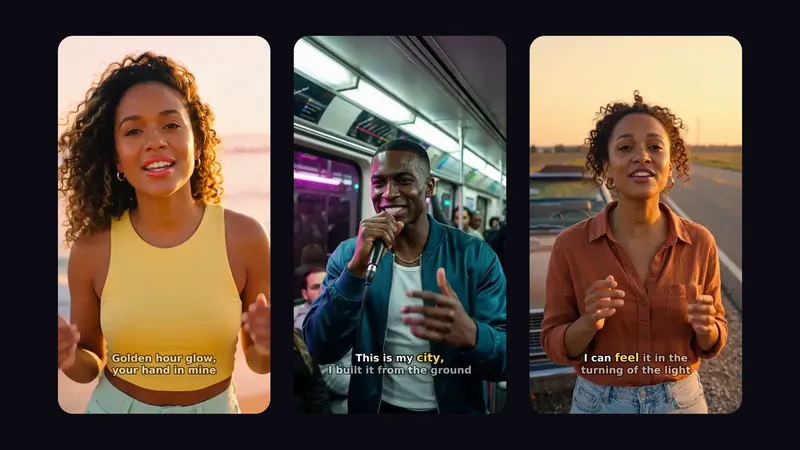
Clipbeat makes vertical music videos from your audio. Set the project to 9:16 and the full-song video is planned and rendered in portrait: one scene for every lyric line, the same main character throughout, cuts on the beat and word-by-word karaoke lyrics sized for a phone screen. From the editor you can also export just the hook as a short clip.
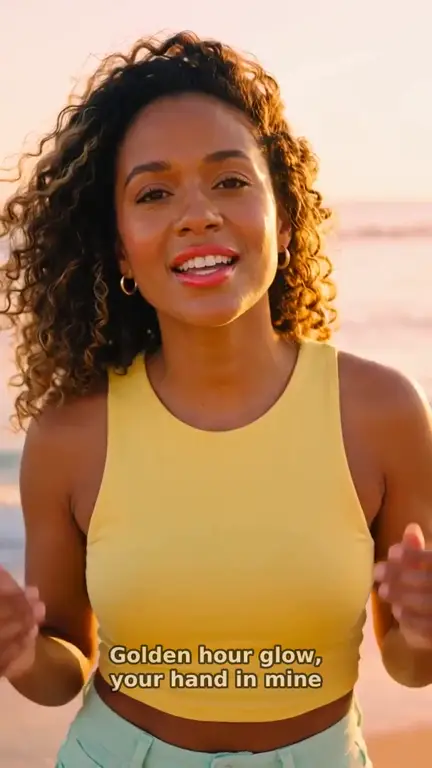
Real output · “Golden Hour Glow”, pop
Clipbeat at a glance
| Price per video | from $5 Standard, $19 Plus or $39 Premium — one-time, priced by song length; a 4-minute song is $14 Standard, $30 Plus or $69 Premium |
|---|---|
| Longer songs | Priced by length, up to 20 minutes; the exact price is shown before you pay |
| Before you pay | Your upload, the timed lyrics and your brief (who sings, the style, the places) — no card needed |
| Scene-by-scene plan | After the $5 chorus preview, before you pay for the full video |
| Chorus preview | A short lip-synced clip of your singer singing your chorus, included in the $5 credit pack |
| Subscription | None — nothing renews |
| Lip-sync | Plus, Premium and Pro (the singing shots follow your vocal) |
| Output | 1080p MP4 without a watermark, 16:9 or 9:16 (1:1 and 4:5 from the editor) |
| Upload | MP3, WAV, M4A, FLAC or AIFF, up to 500 MB |
| Lyrics | Transcribed automatically in 50+ languages, shown word by word, karaoke-style |
How it works
- STEP 1
Upload your song
Drop an mp3 or wav. Lyrics are transcribed with word-level timing, and every word can be corrected.
- STEP 2
Set the project to 9:16
The full-song video follows the project aspect, so a 9:16 project gives you a vertical video framed for phones.
- STEP 3
Check the scene plan
See every lyric line with its planned scene. Adjust the story, the look and the main character before paying for the video.
- STEP 4
Make it and post it
Pay once — Standard ($5), Plus ($19) or Premium ($39) — then publish to a connected TikTok or Instagram account, or download the file.
A real example: “Golden Hour Glow”
A full pop song made into a video with Clipbeat on Premium — 16 scenes, one for every lyric line, the same singer throughout and 5 lip-synced singing shots.
Vertical first, not cropped later
Cropping a widescreen video to 9:16 usually cuts the subject out of the frame and leaves lyrics running off the edges. When the project is vertical from the start, every scene is composed for a tall frame: faces sit in the centre, the setting stretches up and down, and the lyrics are placed where they stay readable above the platform buttons.
The same pipeline as a widescreen video runs underneath. Your vocal is transcribed with word-level timing, a scene is planned for each lyric line, one main character is locked across all scenes and the cuts land on the beat. Only the frame changes.
Full song or just the hook
Short-form platforms reward a strong first few seconds. Many artists post the chorus or the most quotable line rather than the whole track. Clipbeat supports both approaches:
- A full-song vertical video for the full-length post, a pinned video or a Reels upload
- A section of the song exported from the editor — for example the chorus — as its own 9:16 clip
- Other shapes from the same editor: 16:9 for YouTube, 1:1 and 4:5 for feed posts
- Direct publishing to connected TikTok and Instagram accounts, or a downloaded file for any app
Lyrics people can read on a phone
Many viewers watch short videos with the sound low or off. On-screen lyrics carry the song when audio cannot. Clipbeat highlights each word as it is sung, karaoke style, so a viewer can follow the line even on mute — and recognise it later when they hear the song in another video. Because the timing comes from your actual vocal, the highlight follows your phrasing instead of a fixed line-by-line estimate.
About the example
The example on this page is "Golden Hour Glow", a pop demo song made for the showcase on Premium ($39). It is the widescreen version: 2:02, 16 scenes, with lip-sync on 5 singing shots. A 9:16 project goes through the same steps, with every scene composed for a vertical frame instead.
Pricing
A vertical video costs the same as a widescreen one. The chorus preview and the scene plan come first; then you pay once for the song — from $5 Standard, $19 Plus or $39 Premium — and each tier covers the whole track in the aspect you chose:
- Standard (from $5) — the full song with a scene for every lyric line, full motion, word-by-word karaoke lyrics, 1080p without a watermark.
- Plus (from $19) — everything in Standard (full motion, a scene for every lyric line, word-by-word karaoke lyrics, 1080p without a watermark), plus your singer lip-syncing the chorus with your vocals (2–3 shots).
- Premium (from $39) — full motion with the best image and motion models, extra quality checks on every shot, and real lip-sync on up to 12 singing shots.
TikTok, Reels, Shorts and Spotify Canvas
TikTok, Instagram Reels and YouTube Shorts all use the same 9:16 shape, so one vertical video can be posted to all three. Spotify Canvas is different: it is a short, silent looping visual uploaded in Spotify for Artists, and it has its own length limits. If you want a Canvas loop for a release, see the Spotify Canvas maker page — Clipbeat does not publish to Spotify, but it can make the file.
A simple release plan many artists use: post a vertical clip of the hook a week before release, the full vertical video on release day, and the widescreen version on YouTube the same day. All three can come from the same song and the same visual world.
Using AI songs on social platforms
If you made the track with an AI music tool such as Suno, download the song file from Suno and upload it to Clipbeat; importing by link is not supported. Check the music tool's terms for what you may publish or monetise, and the platform's rules on labelling AI-generated content. You need the rights to the music you post.
Frequently asked questions
Can Clipbeat make a vertical 9:16 music video?
Yes. Set the project to 9:16 and the full-song video is planned and rendered vertically. The storyboard comes after the $5 chorus preview, then the video from $5 one-time.
Can I post just the chorus?
Yes. In the editor you can export a section of the song, such as the chorus, as its own 9:16 clip.
Can Clipbeat post to TikTok and Instagram for me?
Yes, if you connect your accounts you can publish directly. You can always download the file and post it yourself instead.
Does the same video work for Reels and Shorts?
Yes. TikTok, Reels and Shorts all use 9:16, so one vertical export fits all three.
Is a Spotify Canvas the same thing?
No. Canvas is a short silent loop uploaded in Spotify for Artists. Clipbeat can make the visual, but you upload it to Spotify yourself.
Make a vertical video for your song
Upload your track, preview the chorus, get a scene plan matched to the lyrics, and make the 9:16 video from $5 one-time.
Make my video