A music video for your single, ready for release week
Upload your song → see a 10-second preview of your music video
No subscription · $5 preview
Updated
Quick answer
How do I get a music video ready for my single release? Upload the final master to Clipbeat one to two weeks before release day. You get a scene plan for every lyric line, then pay once — from $5 (Standard) — for the full 1080p video. From the same project you cut vertical chorus clips for TikTok, Reels and Shorts, so one payment covers the YouTube premiere and the social posts.
Release week is the one moment when a single gets attention from your listeners, playlist curators and the algorithms at the same time. A song that arrives with something to watch — a full video on YouTube, short vertical clips on the apps people scroll — gives every one of them a reason to stop and press play.
Clipbeat builds that video package from your audio file. The full-length video follows your lyrics with a scene for every line and lands its cuts on the beat; the vertical clips come out of the same project, so the look stays consistent from the premiere to the last teaser.
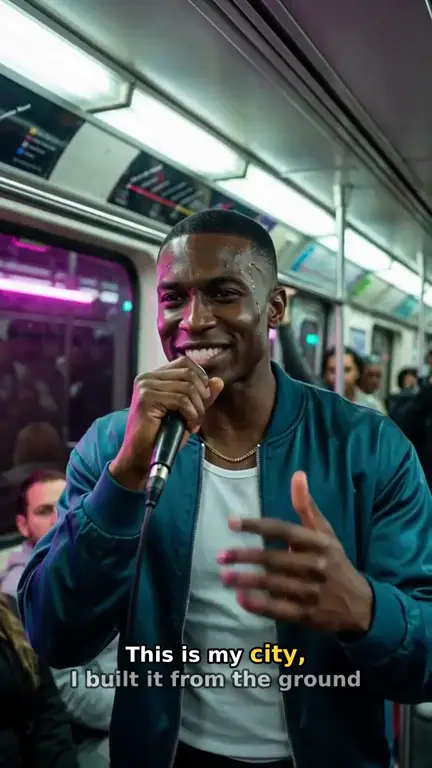
Real output · “Neon Crown”, hip-hop
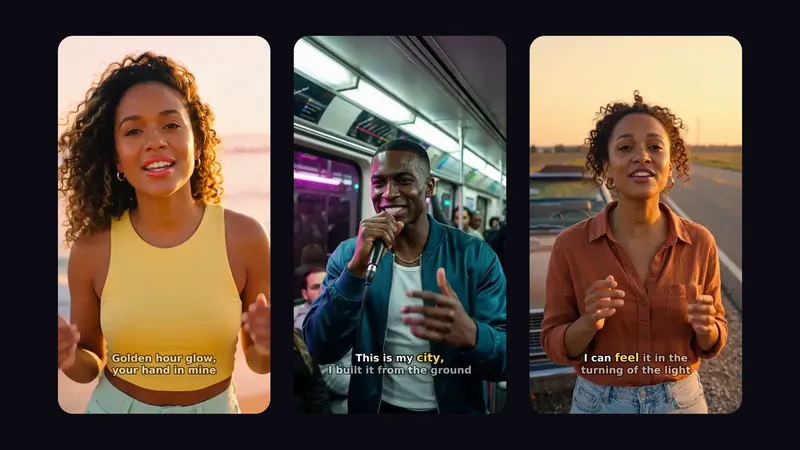
Clipbeat at a glance
| Price per video | from $5 Standard, $19 Plus or $39 Premium — one-time, priced by song length; a 4-minute song is $14 Standard, $30 Plus or $69 Premium |
|---|---|
| Longer songs | Priced by length, up to 20 minutes; the exact price is shown before you pay |
| Before you pay | Your upload, the timed lyrics and your brief (who sings, the style, the places) — no card needed |
| Scene-by-scene plan | After the $5 chorus preview, before you pay for the full video |
| Chorus preview | A short lip-synced clip of your singer singing your chorus, included in the $5 credit pack |
| Subscription | None — nothing renews |
| Lip-sync | Plus, Premium and Pro (the singing shots follow your vocal) |
| Output | 1080p MP4 without a watermark, 16:9 or 9:16 (1:1 and 4:5 from the editor) |
| Upload | MP3, WAV, M4A, FLAC or AIFF, up to 500 MB |
| Lyrics | Transcribed automatically in 50+ languages, shown word by word, karaoke-style |
How it works
- STEP 1
Upload the final master
Use the exact mix you are releasing, not a demo — the timing of every scene and lyric is built on this file.
- STEP 2
Review the scene plan
Read the scene plan line by line, choose the lead (an AI character or "Me" with a selfie) and change anything that does not fit the song.
- STEP 3
Pay once and make the full video
Choose from $5 Standard, $19 Plus or $39 Premium. The full song is rendered in 1080p without a watermark.
- STEP 4
Cut the vertical clips
From the finished project, export the chorus and one or two other strong moments as 9:16 clips for TikTok, Reels and Shorts.
- STEP 5
Schedule the drops
Premiere the full video on release day and spread the short clips across the following days.
A real example: “Run To The Edge”
A full indie rock song made into a video with Clipbeat on Premium — 12 scenes, one for every lyric line, the same singer throughout and 0 lip-synced singing shots.
What a release-week video package contains
You do not need a different video for every platform. You need one strong full-length piece and a few short cuts taken from it. That is how most label campaigns work too, just with a bigger budget.
- The full music video in 16:9 for YouTube and your website
- A 9:16 cut of the chorus — usually the clip people share most
- One or two extra short clips: the opening line, the bridge or the final hook
- A still frame from the video for the thumbnail, the pre-save post and the press kit
When to make it
Start one to two weeks before release day. Rendering the full song takes a while depending on its length and tier, but the real reason for the buffer is you: it lets you check the edit with fresh eyes, fix a scene you do not like, upload the video as unlisted, write the description and set up the premiere without rushing.
If the song is already out, it is not too late. A video released a few weeks after the audio gives you a second announcement — "the video is here" — and a new reason to post about the same track.
A day-by-day plan for release week
A simple schedule that works for most singles:
- Before release: post a 9:16 teaser from the video with a pre-save link
- Release day: premiere the full video on YouTube and pin the chorus clip on TikTok and Reels
- Days 2–3: post a second vertical clip with the lyric on screen
- Days 4–7: share a still or a behind-the-scenes look at how the video was made, and reply to every comment
Which tier fits a single
For most singles Plus ($19) is the sweet spot: your singer lip-syncs the chorus with your vocals — exactly the moment people clip and share — on top of full motion. Standard ($5) is enough when you mainly need a YouTube video and a couple of clips on a small budget (no lip-sync). Premium ($39) lip-syncs up to 12 singing shots across the song, not every line with the best image and motion models. a 4-minute song is $14 Standard, $30 Plus or $69 Premium; longer songs are priced by length before you pay.
An example made from one song
"Run To The Edge" is an indie rock demo song, 1:33 long, turned into 12 scenes that follow the lyric line by line. Watch it on this page: a single project like this one gives you both the full video and the short vertical cuts for release week.
Mistakes that waste a release
Uploading a rough mix and replacing the audio later breaks the lyric timing. Cropping a widescreen video to vertical often cuts the singer out of the frame — set 9:16 for the vertical cuts so the framing is planned for phones. And posting everything on day one leaves nothing for the rest of the week; keep a clip or two in reserve.
Frequently asked questions
How long does it take to make the video?
The scene plan comes soon after the chorus preview. The full render takes longer depending on song length and tier, so starting a week or two before release leaves time to review and change scenes.
Do I pay again for the TikTok and Reels clips?
No. The vertical clips are cut from the project you already paid for; exporting them does not cost extra.
Can I make a video for a song that is already released?
Yes. Upload the released master. A video a few weeks after the audio gives you a second announcement for the same song.
Can I be in the video myself?
Yes. Choose "Me" and add a selfie to be the lead in every scene. Lip-sync on the singing shots is part of Premium ($39).
Is there a subscription?
No. You pay once per video and nothing renews. Uploading the song and the brief come before any payment; the scene plan follows the $5 chorus preview.
Get your single ready for release week
Upload the master, preview the chorus, check the scene plan and pay once — from $5. The full video and the vertical clips come from one project.
Make my video